Think of Database in terms of layers, where each layer exposes well defined APIs to the other layer. From bottom to top
- Disk Manager - Accesing files
- Buffer Pool Manager: Bringing data from files to store buffers in memory
- Access Methods
- Operator Execution
- Query Planning
Looking at Disk Manager today. Row oriented centric view today, which is classical database method.
Disk-based architecture: The DBMS assumes primary storage location of the db is a non-volatile disk. We’ll have to bring data from disk to memory and only then it can be worked on.
Storage Hierarchy: Goes from Network Storage to CPU registers. Goes from slow, cheap, larger to fast, expensive, smaller. These are also go from non-volatile to volatile. We’ll call these Disk, Memory and CPU for the purpose of this course.
Scaled access times: If you assume a L1 cache ref takes 1 sec, then accessing a disk take takes 31.7 years!!
DBMS wants to maximise sequential access. As Random I/O takes 80-100 micros while sequential I/O takes 10-100 micros. Algos try to reduce number of writes to random pages so data is stored in contiguous blocks. Allocating multiple pages at the same time is called an extent
System Design Goals:
- Allow DBMS to manage DBs that exceed amount of memory available
- RW to disk is expensive, so manage carefully to avoid large stalls and performance degradation
- Since Random access on disk is much slower than DBMS, the DBMS wants to maximise the latter.
Disk-Oriented DBMS
Databases will store data in a bunch of files. Only some like SQLite only use 1 file
How the hierarchy looks like:
- Database file has a page directory followed by a bunch of pages which each has a header
- Buffer Pool is in memory which stores pages
To get any page, we’ll first bring the page directory into the buffer pool. At this lowest level, we don’t care what’s in the pages, it’s decided by the upper layers.
File Storage
We’re looking at how the DBMS stores the data in files. These files are not special to the OS and the OS doesn’t know anything about the contents of these files. There are some portable file formats that multiple databases can work on (Parquet ig)
Early systems in 1980s used custom filesystems on raw block storage. Some DBMS like Oracle & Teradata still do, most newer DBMS don’t. A study done said you get ~15% bump on doing custom FS but it’s a major effort.
Storage Manager
- It is responsible for maintaining a database’s files. Some do their own scheduling for reads and writes to improve locality
It organises files as a collection of pages:
- Tracks data read/written to pages
- Tracks the available space.
A DBMS typically does not maintain multiple copies of a page on disk. It can happen on levels elow or above it. Below it, there could be RAID FS. Above it, there could be a system storing multiple copies in separate nodes.
Database Pages
A page is a fixed-size block of data. Each page is given a unique identifier (page ID):
- A page ID could be unique per DBMS instance, per database, or per table.
- The DBMS uses an indirection layer to map page IDs to physical locations.
There are 3 different notions of pages in DBMS:
- Hardware Page (usually 4KB): Smallest unit that can be written to storage atomically to the hardware.
- OS Page(usually 4KB, x64 2MB/1GB, (also huge pages in LInux)): OS keeps track of these in its page directory to access memory
- Database Page (512B-32KB)
Default DB Page sizes:
- 4KB: SQLite, Oracle, RocksDB, WiredTiger
- 8KB: Postgres, SQL Server
- 16KB: MySQL
Optimal size depends on environment, db contents and expected workload.
- DBMS specialising in read-heavy workloads tend to have larger page size (1MB or larger) since fetching a single page brings in many tuples needed for a query.
- For write-heavy workloads, we have smaller page sizes (4-16KB). This is because we have to write entire page to disk even if only a small portion of it is modified.
Page Storage Architecture
- Heap File Organization: Most common one, pages are not ordered in any way. We’re going to be referring to this in the current lecture
- Tree File Organisation: Pages are organised in a tree
- Sequential / Sorted File Organisation (ISAM): Older architecture in 1970s, not used anymore
- Hashing File Organisation
Heap File
It is an unordered collection of pages with tuples that are stores in random order:
- API: Create / Get / Write / Delete Page
- Need to also support iterating over all pages: to support sequential scans
Also need metadata to track location of files and free space availability.
- Database file is a bunch of pages
- Ask to get page #2, calculate offset = page num times page size
- If there are multiple files, we’ll consult the page directory first
Page Directory
- Can have a directory per database, or any other way.
- These are special pages that track location of pages in database files
- One entry per database object - Table, Index
- Needs to be synchronized on disk with the data pages. It needs to be synced in case of crash recovery. There can be ways to recreate it by file metadata, but it’s slower.
Page Layout
What does a page look like?
Page Header
Every page has a header of metadata about the page’s contents:
- Page Size
- checksum: Check for corruption
- version
- Transaction Visibility: What data is visible to which txn, covered later
- Data summary / sketches: for bloom filters ig
- etc..
Some systems require pages to be self-contained (e.g. Oracle).
Page Layout
Need to decide how to organize data inside the page:
- For now storing tuples in a row-oriented storage model
- Assume that each tuple fits in a single page
Three approaches:
- Tuple-oriented storage ⇐ This lecture
- Log-structured storage ⇐ These are discussed in CMU Intro to Database Systems - Lecture 5
- Index-organized storage
Now looking at Tuple-oriented storage.
One strawman idea: keep track of number of tuples in a page and append new tuple to end:
- Deletion leaves holes.
- Can’t do compactions because things might be tracking physical address of the tuple
- Can’t use variable sized tuples
Slotted Pages
After header, we have a slot array which maps “slots” to the tuples’ starting position offsets. Header keeps track of:
- number of used slots
- offset of starting location of last slot used
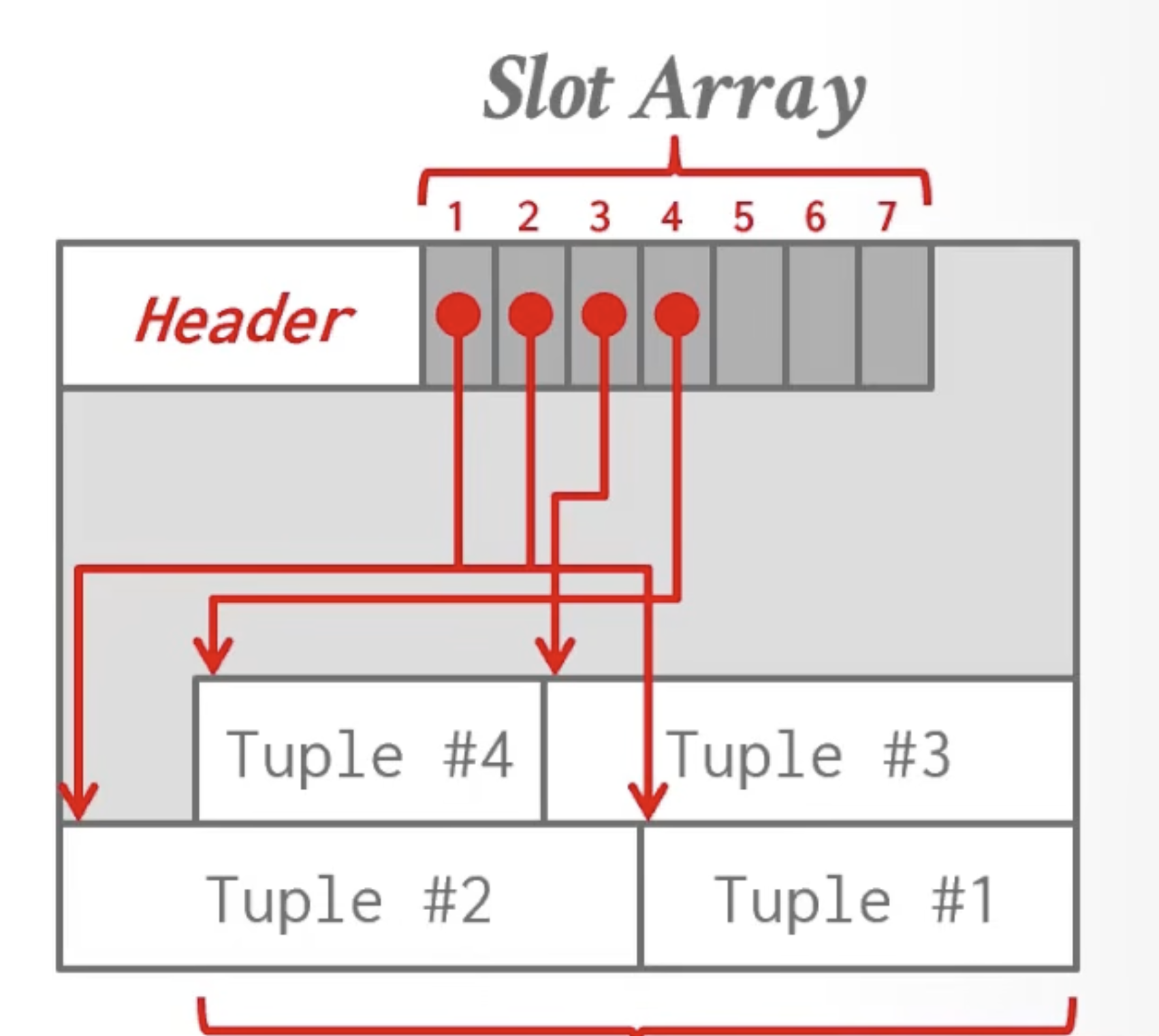
Tuples grow backwards and the slot array goes forwards.
Advantage of this approach:
- After deletion, we can let the tuple in its place or we can move tuples to do compactions by updating the slot array. So we have an indirection due to a slot array
- Also allows us to have fixed and variable sized tuples
Record IDs
Each logical tuple has a unique record identifier that represents its physical location in the DB.
- Eg: File Id, Page Id, Slot number
- Most DBMS don’t store ids in tuple. SQLite is different as it uses ROWID as the true primary key and stores them as a hidden attribute
This is used to store location of the tuple in things like an index.
Record Id Sizes:
- Inges, called TID, 4 bytes
- PG: CTID, 6 bytes
- SQLite: ROWID, 4 bytes
Applications should never rely on these IDs to mean anything. E.g. after compaction, the record id can change as the tuple may be in a different physical place
Tuple Layout
- It’s a sequence of bytes prefixed with a header that contains metadata about it.
- It’s job of the DBMS to interpret those bytes into attribute types and values
Typically, it doesn’t contain metadata about the schema since that’s stored at the page level. So usually we have tuples of one type in a table. The tuple header might have eg a bitmap about which columns are null.
Tuple header
Can have visibility information for txn concurrency control and bitmap
Tuple data
Attributes typically stored in order that you specify them when you create the table.
Data Layout
Sequence will be Header -> id -> value and we’ll do a cast after getting to the right address
Word Aligned tuples
All attributes in a tuple must be word aligned to enable the CPU to access it without any unexpected behaviour. A way to use 32-bit items in 64-bit words, e.g., is to use padding.
So for 64-bit word, we can do 32-bit int + 32-bit padding + 64-bit timestamp + …
Or we can move around the fields so that padding is reduced. Systems don’t usually do this.
Data Representation
- Int family : Same as in C/C++. Do have to worry about endianness. SQLite handles the endianness so that moving the file to a different endian system works
- Float/Real : IEEE 754 standard
- Numeric/Decimal: Fixed-point decimals
- Varchar/text/blob:
- Header with length, followed by data bytes OR pointer to another page/offset with data
- Need to worry about collations (Unicode etc) / sorting
- Time/data: integer since Unix epoch
Variable Precision Numbers
Store directly as specified by IEEE 754. Faster than fixed precision numbers, but we don’t guarantee precision.
For-example, in float 0.3 is stored as 0.29999999998890 as this is the closed float number
Fixed Preicision Numbers
We’ll store precision and scale, basically metadata along with byte array so we don’t lose precision as an example. These are used when rounding errors are unacceptable.
Numeric in Postgres:
typedef struct {
	int ndigits; // number of digits
	int weight; // weight of first digit
	int scale;
	int sign;
	NumericDigit *digits; // unsigned char*
}
Need specialised code to do arithmetic on these numbers, not just simple hardware instructions.
Null Data Types
There are choices on how to store:
- Null column bitmap header: Store a bitmap that specifies which attribbutes are null. Most common approach in row-stores
- Special Values: Designate a placeholder value to represent NULL for a datatype (e.g. int_min), more common in column-stores. Don’t have to store extra metadata per tuple
- Per attribute null flag: 1-bit flag in front of the attribute to mark if a value is null. Takes more space than a single bit since it messes up with word alignment. DO NOT DO THIS.
Large Values
Most DBMSs do not allow a tuple to exceed the size of a single page. To store them, we use separate overflow storage pages. In the tuple, we store a pointer (record id) to the overflow page
So, in tuple we have size+location pointing to somewhere in overflow page.
When do systems use overflow pages:
- Postgres: >2KB
- MySQL : >1/2 size of page
- SQL Server: >size of page
Potential optimizations to compress data in these overflow pages.
German Strings: Store prefix of the string and store rest in overflow page. So prefix checks are fast and don’t need another disk access to overflow page.
External Value Storage
Some systems allow to store a large value in an external file. It is treated as a blob type
- Oracle: BFILE data type
- Microsoft: FILESTREAM data type
The DBMS cannot manipulate context of the external file. No durability & txn protections
Paper: To BLOB or Not To BLOB.